1) Terminologies
The following are the most important terms related to REST APIs
- Resource is an object or representation of something, which has some associated data with it and there can be set of methods to operate on it. E.g. Animals, schools and employees are resources and delete, add, update are the operations to be performed on these resources.
- Collections are set of resources, e.g Companies is the collection of Company resource.
- URL (Uniform Resource Locator) is a path through which a resource can be located and some actions can be performed on it.
2) API endpoint
Let’s write few APIs for Companies which has some Employees, to understand more.
/getAllEmployees is an API which will respond with the list of employees. Few more APIs around a Company will look like as follows:
/addNewEmployee/updateEmployee/deleteEmployee/deleteAllEmployees/promoteEmployee/promoteAllEmployees
And there will be tons of other API endpoints like these for different operations. All of those will contain many redundant actions. Hence, all these API endpoints would be burdensome to maintain, when API count increases.
What is wrong?
The URL should only contain resources(nouns) not actions or verbs. The API path/addNewEmployee contains the action addNew along with the resource name Employee.
Then what is the correct way?
/companies endpoint is a good example, which contains no action. But the question is how do we tell the server about the actions to be performed on companies resource viz. whether to add, delete or update?
This is where the HTTP methods (GET, POST, DELETE, PUT), also called as verbs, play the role.
The resource should always be plural in the API endpoint and if we want to access one instance of the resource, we can always pass the id in the URL.
- method
GETpath/companiesshould get the list of all companies - method
GETpath/companies/34should get the detail of company 34 - method
DELETEpath/companies/34should delete company 34
In few other use cases, if we have resources under a resource, e.g Employees of a Company, then few of the sample API endpoints would be:
GET /companies/3/employeesshould get the list of all employees from company 3GET /companies/3/employees/45should get the details of employee 45, which belongs to company 3DELETE /companies/3/employees/45should delete employee 45, which belongs to company 3POST /companiesshould create a new company and return the details of the new company created
Conclusion: The paths should contain the plural form of resources and the HTTP method should define the kind of action to be performed on the resource.
3) HTTP methods (verbs)
HTTP has defined few sets of methods which indicates the type of action to be performed on the resources.
The URL is a sentence, where resources are nouns and HTTP methods are verbs.
The important HTTP methods are as follows:
GETmethod requests data from the resource and should not produce any side effect.
E.g/companies/3/employeesreturns list of all employees from company 3.POSTmethod requests the server to create a resource in the database, mostly when a web form is submitted.
E.g/companies/3/employeescreates a new Employee of company 3.
POSTis non-idempotent which means multiple requests will have different effects.PUTmethod requests the server to update resource or create the resource, if it doesn’t exist.
E.g./companies/3/employees/johnwill request the server to update, or create if doesn’t exist, the john resource in employees collection under company 3.
PUTis idempotent which means multiple requests will have the same effects.DELETEmethod requests that the resources, or its instance, should be removed from the database.
E.g/companies/3/employees/john/will request the server to delete john resource from the employees collection under the company 3.
Other examples :
Social Media Application Resource Mappings
User -> Posts
Retrieve all Users – GET /users
Create a User – POST /users
Retrieve one User – GET /users/{id} -> /users/1
Delete a User – DELETE /users/{id} -> /users/1
Retrieve all posts for a User – GET /users/{id}/posts
Create a posts for a User – POST /users/{id}/posts
Retrieve details of a post – GET /users/{id}/posts/{post_id}
An other example:
- GET /tickets – Retrieves a list of tickets
- GET /tickets/12 – Retrieves a specific ticket
- POST /tickets – Creates a new ticket
- PUT /tickets/12 – Updates ticket #12
- PATCH /tickets/12 – Partially updates ticket #12
- DELETE /tickets/12 – Deletes ticket #12
4) HTTP response status codes
When the client raises a request to the server through an API, the client should know the feedback, whether it failed, passed or the request was wrong. HTTP status codes are bunch of standardized codes which has various explanations in various scenarios. The server should always return the right status code.
The following are the important categorization of HTTP codes:
2xx (Success category)
These status codes represent that the requested action was received and successfully processed by the server.
- 200 Ok The standard HTTP response representing success for GET, PUT or POST.
- 201 Created This status code should be returned whenever the new instance is created. E.g on creating a new instance, using POST method, should always return 201 status code.
- 204 No Content represents the request is successfully processed, but has not returned any content.
DELETE can be a good example of this.
The APIDELETE /companies/43/employees/2will delete the employee 2 and in return we do not need any data in the response body of the API, as we explicitly asked the system to delete. If there is any error, like ifemployee 2does not exist in the database, then the response code would be not be of2xx Success Categorybut around4xx Client Error category.
3xx (Redirection Category)
- 304 Not Modified indicates that the client has the response already in its cache. And hence there is no need to transfer the same data again.
4xx (Client Error Category)
These status codes represent that the client has raised a faulty request.
- 400 Bad Request indicates that the request by the client was not processed, as the server could not understand what the client is asking for.
- 401 Unauthorized indicates that the client is not allowed to access resources, and should re-request with the required credentials.
- 403 Forbidden indicates that the request is valid and the client is authenticated, but the client is not allowed access the page or resource for any reason. E.g sometimes the authorized client is not allowed to access the directory on the server.
- 404 Not Found indicates that the requested resource is not available now.
- 410 Gone indicates that the requested resource is no longer available which has been intentionally moved.
5xx (Server Error Category)
- 500 Internal Server Error indicates that the request is valid, but the server is totally confused and the server is asked to serve some unexpected condition.
- 503 Service Unavailable indicates that the server is down or unavailable to receive and process the request. Mostly if the server is undergoing maintenance.
5) Searching, sorting, filtering and pagination
All of these actions are simply the query on one dataset. There will be no new set of APIs to handle these actions. We need to append the query params with the GET method API.
Let’s understand with few examples how to implement these actions.
- Sorting In case, the client wants to get the sorted list of companies, the
GET /companiesendpoint should accept multiple sort params in the query.
E.gGET /companies?sort=rank_ascwould sort the companies by its rank in ascending order. - Filtering For filtering the dataset, we can pass various options through query params.
E.gGET /companies?category=banking&location=indiawould filter the companies list data with the company category of Banking and where the location is India. - Searching When searching the company name in companies list the API endpoint should be
GET /companies?search=My Company - Pagination When the dataset is too large, we divide the data set into smaller chunks, which helps in improving the performance and is easier to handle the response. Eg.
GET /companies?page=23means get the list of companies on 23rd page.
If adding many query params in GET methods makes the URI too long, the server may respond with 414 URI Too long HTTP status, in those cases params can also be passed in the request body of the POST method.
6) Versioning
When your APIs are being consumed by the world, upgrading the APIs with some breaking change would also lead to breaking the existing products or services using your APIs.
http://api.yourservice.com/v1/companies/34/employees is a good example, which has the version number of the API in the path. If there is any major breaking update, we can name the new set of APIs as v2 or v1.x.x
Richardson Maturity Model
Richardson Maturity Model is used to identify the maturity level of a Restful Web Service. Following are the different levels and their characteristics:
- Level 0 : Expose SOAP web services in REST style. Expose action based services (http://server/getPosts, http://server/deletePosts, http://server/doThis, http://server/doThat etc) using REST.
- Level 1 : Expose Resources with proper URI’s (using nouns). Ex: http://server/accounts, http://server/accounts/10. However, HTTP Methods are not used.
- Level 2 : Resources use proper URI’s + HTTP Methods. For example, to update an account, you do a PUT to . The create an account, you do a POST to . Uri’s look like posts/1/comments/5 and accounts/1/friends/1.
- Level 3 : HATEOAS (Hypermedia as the engine of application state). You will tell not only about the information being requested but also about the next possible actions that the service consumer can do. When requesting information about a facebook user, a REST service can return user details along with information about how to get his recent posts, how to get his recent comments and how to retrieve his friend’s list.
Using appropriate Request Methods
Always use HTTP Methods. Best practices with respect to each HTTP method is described below:
- GET : Should not update anything. Should be idempotent (same result in multiple calls). Possible Return Codes 200 (OK) + 404 (NOT FOUND) +400 (BAD REQUEST)
- POST : Should create new resource. Ideally return JSON with link to newly created resource. Same return codes as get possible. In addition : Return code 201 (CREATED) is possible.
- PUT : Update a known resource. ex: update client details. Possible Return Codes : 200(OK)
- DELETE : Used to delete a resource.
Project Structure
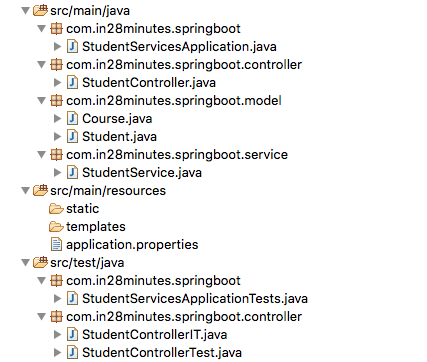
Following screenshot shows the structure of the project we will create. 
A few details:
StudentController.java– Rest controller exposing all the three service methods discussed above.Course.java, Student.java– Models with getters / setters .StudentService.java– Business Logic for the application. StudentService exposes a couple of methods we would consume from our Rest Controller. Methods such as retrieveAllStudents() , retrieveStudent(String studentId) etcStudentControllerIT.java– Integration Tests for the Rest Services.StudentControllerTest.java– Unit Tests for the Rest Services.StudentServicesApplication.java– Launcher for the Spring Boot Application. To run the application, just launch this file as Java Application.pom.xml– Contains all the dependencies needed to build this project. We will use Spring Boot Starter Web.
 Suman's Technology Notes